
PKR365 Deposit & Withdrawal Guide – Payment Help
Ever made a PKR365 payment, but the amount didn’t appear in your account? Unsure what to do next? No worries! This guide explains what to do when a PKR365 deposit or withdrawal is delayed, missing or still pending.
from making a deposit correctly to requesting a withdrawal, you’ll learn how to select an available payment method, follow the transfer instructions, save your transaction reference and check your payment status.
PKR365 Payment Area: Deposits, Withdrawals & Transaction History
Ever opened your wallet and wondered where to find your deposit, withdrawal, or payment history? The PKR365 payment section brings your wallet, deposit methods, withdrawal options, and transaction records together in one place, making it easier to manage and track your payment activity.
You will normally find separate options or adding funds, requesting a payout and reviewing earlier transactions.
| Payment area | Purpose |
|---|---|
| Deposit or Recharge | Opens the available methods for adding money |
| Withdraw | Allows eligible funds to be sent to a linked payment account |
| Balance | Shows the amount currently displayed in the wallet |
| Transaction Records | Stores deposit and withdrawal requests with their status |
The available payment method may depend on your account and the options currently shown in the app. Do not send money using details copied from an old transaction because the receiving information can be different for a new request.
If you have not yet created an account, you can visit the main PKR365 Game for APK and account setup information.
PKR365 Deposit and Withdrawal Methods

Easypaisa
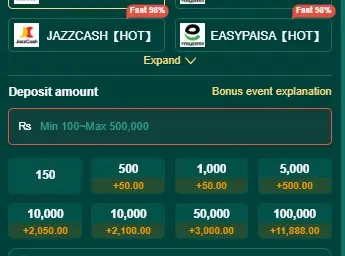
EasyPaisa is a widely used mobile wallet in Pakistan for convenient deposits and withdrawals. Users can make payments through the EasyPaisa app, USSD service, or authorized agents. The minimum deposit is Rs. 100, while the maximum deposit is Rs. 50,000. Transactions are generally processed instantly, with no payment fee.

Easypaisa
JazzCash is a popular mobile wallet in Pakistan that allows users to make convenient deposits and withdrawals.The service is available 24 hours a day, with a minimum of Rs. 100 and a maximum of Rs. 50,000 deposit and withdraw amount. Transactions are generally processed instantly, with no payment fee.
Easypaisa
Bank Transfer is a convenient option for users who prefer to deposit or withdraw funds through their bank account. The minimum deposit and withdrawal amount is Rs. 500, while the maximum is Rs. 50,000. Bank transfers are typically processed within 15 minutes to 2 hours, with no payment fee.
What to Check Before Making a Deposit?
Want to add money without facing an avoidable payment problem? Take a moment to check the Deposit or Recharge page before transferring anything.
Check the Displayed Transaction Range
The payment page may show the lowest and highest amount accepted by the selected channel. Enter an amount within that range. If the amount is below or above it, the transaction may not be created correctly.
Confirm the Receiving Details
Use the recipient number, bank information or payment instructions generated for the current deposit request. Compare every digit before confirming the transfer.
Check the Deposit Amount Twice
The amount sent through the bank or mobile wallet should match the amount entered in PKR365. A different amount can make it harder for the system to identify the payment automatically.
How to Complete a PKR365 Deposit?
Ready to recharge your PKR365 wallet? Follow these simple steps and review each detail before confirming the transfer.
- Open Deposit or Recharge from the wallet area.
- Select one of the payment channels available in your account.
- Enter an amount within the range displayed on the screen.
- Review the receiving information and any on-screen instructions.
- Open the selected bank or mobile-wallet service.
- Transfer the exact amount to the displayed recipient.
- Complete any required confirmation on the PKR365 payment page.
- Save the receipt or successful transaction message.
- Return to your account and review the wallet balance.
- Open Transaction Records if the amount does not appear immediately.
Did the page become slow while you were paying? Avoid tapping the payment button repeatedly. First check whether more than one request has been created.
How to Read Your Deposit Status?
Are you unsure whether your payment went through? Your Transaction Records can show whether the deposit has been received or still needs attention. The wording may vary, but the common status types are easy to understand.
| Deposit status | What it usually means | What to do next |
| Pending or Processing | The request is still being checked | Wait and refresh the record later |
| Successful or Completed | The deposit has been approved | Check whether the wallet balance has updated |
| Failed | The transaction was not completed | Check the payment account before trying again |
| Cancelled | The request was closed before completion | Create a new request if no money was transferred |
Always compare the status in PKR365 with the payment status in your bank or mobile wallet. A PKR365 request marked as failed does not by itself confirm whether money left the external payment account.
How to Report a Missing Deposit?
Did your bank or mobile wallet show the payment as successful, but the amount is still missing from your PKR365 balance? Don’t panic! Start by opening Transaction Records and finding the relevant recharge to check its current status and transaction details.
Confirm the amount, submission time and displayed status. Wait at least 15 minutes, refresh the balance and reopen the app if necessary.
If the amount is still missing, prepare the following details:
- PKR365 profile or account ID
- Deposit amount
- Transaction ID or reference number
- Date and exact payment time
- Name of the selected payment channel
- PKR365 transaction status
- Successful payment message or receipt
Contact customer service through the support option available inside PKR365 and explain that the external payment is successful but the wallet balance has not been credited.
What a Useful Deposit Screenshot Should Show
A clear payment screenshot should show the amount, transaction ID, date, time and successful status. Crop or hide unrelated personal details. The support team needs enough information to trace the transfer, not access to the payment account.
Do Not Make the Same Deposit Again
It can be tempting to send the money again when the first payment is missing. However, a second transfer does not repair the first transaction. It creates another payment that must be tracked separately. Wait for the first deposit to be checked before deciding whether to create a new request.
What to Check Before Withdrawing
Want to withdraw your available money? Before opening the withdrawal form, check that the account is ready for a payout.
Make sure:
- The intended funds appear in the available balance.
- The amount is eligible for withdrawal.
- The selected payout account belongs to the correct person.
- The account number or mobile-wallet number is active.
- The requested amount falls within the displayed range.
- No earlier withdrawal for the same balance is still pending.
- Any conditions connected with the balance have been completed.
If a bonus forms part of the displayed balance, review its current conditions before submitting a withdrawal. Detailed promotional rules belong in the PKR365 bonuses and rewards guide.
How to Add a Withdrawal Account
Is this your first withdrawal? PKR365 may require you to add a payout account before sending money. Incorrect information at this stage can delay later requests, so take your time.
Select the Available Account Type
Open the withdrawal page and choose from the payout methods currently displayed. The method selected here should match the information you are ready to provide.
Enter the Account Holder’s Details
Type the account-holder name exactly as required. Avoid unnecessary spaces, spelling differences or nicknames if the form expects the registered payment name.
Enter the Payment Number Carefully
Check every digit of the bank account or mobile-wallet number. A one-digit error can send the request for review or cause it to fail.
Review Before Saving
Read the complete information again before confirming the payout account. If PKR365 does not provide an edit option after saving, contact customer service instead of submitting a withdrawal to incorrect details.
How to Submit a PKR365 Withdrawal
Once your payout account has been added correctly, requesting a withdrawal is straightforward:
- Open the Withdraw page.
- Select the intended payout account.
- Review the balance available for withdrawal.
- Check the amount range displayed for the selected channel.
- Enter the withdrawal amount.
- Review the payment number and account-holder details.
- Complete the requested account-security confirmation.
- Submit the withdrawal once.
- Open Transaction Records to confirm that the request appears.
- Keep the transaction reference until the money reaches the selected account.
The withdrawal record is the best place to follow progress. Repeated requests should not be submitted while the original transaction remains under review.
How to Read Your Withdrawal Status
Has your withdrawal not arrived yet? First, check the status shown in your withdrawal history. Understanding the stage helps you decide whether to wait, correct information or contact support.
| Withdrawal status | What it usually means | Recommended action |
| Submitted | The request has entered the system | Confirm that the amount and account are correct |
| Pending or Reviewing | The request is being checked | Wait and monitor Transaction Records |
| Approved | PKR365 has accepted the request | Allow time for the payment channel to complete it |
| Completed | The transfer is recorded as finished | Check the receiving bank or mobile wallet |
| Rejected | The request did not meet a requirement | Read the displayed reason and correct the issue |
| Failed | The transfer could not be completed | Verify the payout details and contact support if needed |
| Cancelled | The request was closed | Check whether the amount returned to the wallet |
A completed status and a received payment are two related but separate checks. If PKR365 shows Completed but the destination account has not received the money, collect proof from both sides before reporting the issue.
How to Fix a Pending or Failed Withdrawal?
Is your withdrawal stuck, rejected, or returned? The solution depends on the status of your transaction and the payment details linked to your withdrawal request.
Withdrawal Is Still Pending
Open the request and note its transaction ID, amount and submission time. Check whether PKR365 is asking for additional information. If no action is requested, avoid creating another withdrawal for the same amount while the first remains open.
Withdrawal Was Rejected
Read the reason shown beside the transaction. Recheck the payout-account details, available balance and any conditions attached to the funds. Correct the stated problem before submitting a new request.
Withdrawal Shows Completed but Money Is Missing
Check the transaction history of the receiving bank or mobile wallet. If no payment appears, contact PKR365 support with the withdrawal reference, amount, completion time and a screenshot of the status.
Withdrawal Account Information Is Wrong
Do not continue using incorrect payout details. Look for an edit or account-management option. If the information cannot be changed, ask customer service to explain the correction process before making another withdrawal.
Amount Returned to the PKR365 Wallet
A returned amount normally means the request did not complete. Open its record to check for a reason. Confirm the payment details and current requirements before trying again.
How to Keep Useful Payment Records?
Want customer service to understand your problem quickly? Keep a simple record for every deposit and withdrawal until it has been completed on both sides.
Save the following information:
| Record | Why it matters |
| PKR365 transaction ID | Identifies the request inside the platform |
| External payment reference | Identifies the transfer in the bank or mobile wallet |
| Amount | Confirms the value being traced |
| Date and time | Helps match records from both services |
| Payment method | Shows which channel handled the transaction |
| Final status | Confirms how the request ended |
Do not store passwords, PINs or verification codes with transaction screenshots. Payment proof should confirm a transfer without exposing access to the account.
Conclusion
Still worried about a delayed payment? Not a problem! Start with Transaction Records, confirm the status and keep your payment proof ready. A transaction ID, exact time, amount and clear receipt give customer service the information needed to investigate the correct request.
For deposits, use the current receiving information and send the exact entered amount. For withdrawals, check the payout account carefully and track the request until the funds arrive. These small steps can make the whole PKR365 payment process clearer and easier to manage.